Thursday, 17 January 2013

A challenging way to write


I was inspired by Ann and Chris over at HighlyAllotchthonous to try to write up what I study using a text editor which limits one to using only the 1000 most commonly used words.

Here follows my attempt to describe metamorphic petrology and 3D models of hydrothermal alteration systems using none of those words:

I study rocks that have changed because they got hot or because too many other rocks were on top of them. The bits that make up rocks can change quite a lot because of just how hot it is, and also because of how much stuff is on top of it.  Different bits of rock like to give away some the stuff they are made of when they get hotter (and/or they go deeper under other rocks), and instead take different stuff from other rock bits.  Studying which stuff appears more in one rock bit than another rock bit can tell us just how hot or how deep the rock must have been. 

Another thing which can make rocks change is water. When hot water moved through the cracks in rocks it can help carry stuff between the rock bits.  My job today studies rocks that had water help them to change, and I am trying to make a drawing that shows all of the changes as they happened-a drawing that one can look at from any side: top, bottom, left, right, front or back. When the drawing is done you will be able to turn it any way you want and see how the rocks have changed.

Thursday, 6 December 2012

New toys are inspiring


I have always been a visual person, and one of my favourite parts about being a petrologist is the pretty photos of thin sections that I have collected.  I also love organizing stuff—I was one of those kids who had even more fun sorting my legos by colour, size, and type than I did actually building things out of them.  However, until this week, it had never occurred to me that it would be possible to do visual organization of my photos.  Oh, sure, I had some organization of my sample photos—a folder for all the thin section photos, and sub folders for each sample. Another folder for photos of drill cores, with sub folders for each drill hole, and under those more sub folders for each box of core (since when using my phone I need to take nine photos per tray of core in order to photograph every bit of it.

But that was where my organizational system stopped.  If I wanted to do something like, gather together all of the rhyolite samples and look to see if they were similar or different to one another I would open the spreadsheet of samples, sort by rock type, then, one sample at a time go through the folder of photos for each sample, import it into my drawing program, add text, insert a new page for the next sample, repeat.

Then I read a blog post by my favourite medieval textile scholar describing the photo organizational database she uses.  She mentioned that one can store photos in a folder yet, at the same time, have “albums” to organize them, and the possibility of one photo belonging to more than one album, without duplicating the photo. Her description of being able to define smart albums based on key words associated with the photos caught my attention, so I went off and got a copy of the program.

Doing this has really re-inspired me to work. My partner and I recently bought a house, and a rather large part of me had been resenting “work” as something that was interfering with important things like getting the house unpacked and organized, and exploring the forest outside of our door.  But now I am keen to come into the office and play with my photos and organize them. I am actually looking forward to writing papers, because choosing the right image to show the feature I describe in the text will be so easy with this tool.

So far I have created albums for each drill hole, and sub albums within the drill holes for the individual samples. I have copied all of the notes I took for each sample into the album description, so I can see at a glance which phases are present, what rock type I assigned the sample to, where the sample comes from, and so much more.  I am adding key words to my samples so that I can later ask to see all photos containing feldspar, or pyrite, or whatever, and I will get them.  The program lets one select multiple photos at once and apply key words to them all at one go, which saves time.

One bit of advice if you decide to do something like this:  Decide on your key word pattern as early as possible.  My photos are marked with a variety of types of key words, and my first attempt I just typed in useful words like “PPl”, “XPL”, “folded” “Qtz”, “10X” etc. But then I realized that one can add key words from a drop-down menu, which is sorted alphabetically.  After I made that realization I added a type code to the front of the key words, and now I can specify if the key word is a “drill hole”, the “scale”, a mineral (“min”), a phase that only shows up in this sample as inclusions within another mineral (“inc”), the rock type, structure, or any number of other categories that I will come up with later.  This makes choosing the keywords much easier, as they are now grouped together, so I can click on the one I need.

Monday, 17 September 2012

Importing Air Photos into Leapfrog


Some time back I received some air photos of the region I am currently working in from one of my colleagues. Last week I discovered that it is possible to easily import those photos into the program Leapfrog and thus see the lay of the land with respect to the locations of the various drill cores. However, he gave me six different photos but I only received corresponding “.tab” files for three of them. It is the data in the .tab files that tells the program how to import the photos—where are they located.  Therefore I set myself a quest: work out how to create .tab files for the other photos.  Having learned a number of things in the process, I thought I would share them here.

Step One in the process is deciding what points you want to use as markers.  Choose a place on the photo that is easily recognizable (like a cross-road intersection).  Then open GoogleEarth in one window and the air photo in another (using two monitors at once really helps!).  Zoom in to the selected location in google earth, and click on the thumb-tack shaped icon to get a marker. Drag that marker to where you want it, and give the marker a name (such as “T-intersection, upper left corner of Airphoto_a.jpg”), and save the location.  You can now look up the latitude and longitude of this point by clicking on it and selecting “properties”.

Step Two is to use an on-line form such as this one  (option: “Transverse Mercator Calculator”) to convert the latitude and longitude into the Swedish national grid known as RT-90 (that is the format of the drill hole locations with which I am working—if you are working in a different area you will need to instead convert to the appropriate coordinates for your area).

Step Three is to determine the X-Y coordinates on the photo itself of the selected location.  First look up the size of the photo by importing of it into Leapfrog without worrying about the fact that there is not yet a .tab file for it.  Then right-click on it to open the properties dialogue box and make note of the photo size (mine happened to be 1404 wide and 940 tall). (It is a good idea to now delete the photo from Leapfrog, since it is not, yet, in the correct spot). Now that you know the photo size that Leapfrog will be using, import the photo in CorelDraw, and change the size of the photo to those values.

Now you are ready to for Step Three itself: Use the “guidelines setup” dialogue box of CorelDraw to create two guidelines, one horizontal, one vertical, both located at zero. Then turn on the “snap to guidelines” feature and set the photo so that the upper left corner of the photo is located at the newly created 0,0 intersection.  At this point it is a good idea to “lock” the layer the photo is on so that you do not accidently move it during subsequent measurements.

Now that the photo is properly positioned drag new guidelines onto the photo such that they intersect at the spot you selected in Step One. Re-open the “guidelines setup” dialogue box and edit the position of those lines to the nearest whole number (e.g. 57.3456 becomes “57”) and look at the revised position to be certain you are happy with the location of the intersection of the guidelines.

Step Four: edit a .tab file with the numbers determined in Steps Two and Three.

The files he gave me have this format:

****************************
!table
!version 300
!charset WindowsLatin1

Definition Table
  File "airphoto_kriberg_a.jpg"
  Type "RASTER"
  (X,Y) (A,B) Label "Pt 1",
  (X,Y) (A,B) Label "Pt 2",
  (X,Y) (A,B) Label "Pt 3"
  CoordSys Earth Projection 8, 112, "m", 15.8082777778, 0, 1, 1500000, 0
  Units "m"
 ****************************

Where X and Y are the east and north coordinates of each spot in the RT90 format (Step Two) and A and B are the positions on the photo itself (Step Three).  Edit this to have the numbers you determined above, and repeat for two more spots on the photo.  Save as a .tab file in the same folder as the photo itself.

Step Five: import into Leapfrog.  If you edited the .tab file correctly choosing the “import image” option will open up a dialogue box that shows a circle, a square, and a triangle each superimposed over the photo on one of the three points of interest you selected. If they are in the correct spot click “ok” and your photo is imported.  If you don’t get a dialogue box but only an error message one possibility is that you could have introduced a blank space after the coma and before the next number. This is easily solved by deleting that space.

There may well be a simpler way (more automated) way to create .tab files for importing air photos into Leapfrog. If anyone knows of one do please share in a comment.  In the meantime writing down what I did will help me remember next time I need to do this.

Monday, 30 July 2012

Tasmanian Metemorphic Geology; It is wilder than you think.


This morning I received comments from reviewers on the manuscript I recently submitted.  I was delighted to see that they recommend that the article be accepted, after minor revision.  Even more than that, I am very happy that one of them took the time to actually read the text closely enough to catch some important typographic errors.  Of all of them that he found, my favourite is:  "...rocks wildly distributed throughout Tasmania". 

While, I have, on occasion, used the term “in the wild” when referring to rock types I have personally seen on a outcrop in the field (as opposed to in a rock collection in a lab or museum), I am quite certain that what I was thinking when I typed that phrase (and must have thought I saw on every subsequent re-read of the manuscript) was “widely distributed”.  My thanks to this reviewer, and to all reviewers who take the time to be certain that such errors never make it to the published version of a document.

Friday, 27 April 2012

What about GeoSociety journals?


There has been a fair bit of attention recently in the media and on science blogs about the evils of the academic publishing industry and how much profit the publishers get for all of the unpaid work that scientists provide in terms of writing, editing, and reviewing the content, combined with a cry for academics to consider publishing instead in open access journals.  This suggested solution makes a certain amount of sense to me, but I find myself wondering about the journals which are associated with Geologic Societies (for example the Australian Journal of Earth Science, which is available to members of the Geological Society of Australia, or Elements, which is available to members of number of Mineralogical societies in a variety different countries).  These journals are not open access, but the memberships base of the societies are, sometimes, very extensive, and some of these societies have reasonable membership rates.

For those of you who are actively participating in the boycott of journals which are hidden behind a pay-wall, how do you feel about journals which are associated with such societies? There is still a pay-wall, and in some (all?) cases there is a professional publisher which does the publishing on behalf of the society (Taylor & Francis and GeoScience World  for the above two examples).  Does the fact that the journal is one of the perks to membership in the society help alleviate the concerns about paywalls?  Are these sorts of journals handled any differently than those which are only for profit of the publisher?

I am wondering about this because I am just about ready to submit an article for publication, and the most logical journal for that particular research happens to be AJES. Therefore I would appreciate hearing other people’s thoughts on this subject.

Wednesday, 21 March 2012

yet another academic publishing blog

I have seen a variety of other blogs discussing the problems in the academic publishing system, with many discussions as to *why* the system is continuing to thrive, depsite the presence of the internet having rendered most of the services provided by publishers obslete. However, none of the discussions which have crossed my path address what, to me, is likely the biggest reason. As scientists our publication records matter—if we don’t have “enough” first-author papers published we don’t land jobs in acaidmeia, and we don’t get grants if we have jobs. The universities for which we work are ranked, in part, by the number of publications we produce, and the quality of the journals in which we publish. The more “A” ranked journal articles produced by a given university, the better it is considered to be, and the easier time it has of getting funding. So long as funding decisions are based, in part, on our list of publications, and so long as the prestiege of the journals in which we are publishing matters, the system will continue to thrive, despite so many of us being unhappy with it. Is there hope of this changing? Perhaps, if enough people want it to change.

Tuesday, 20 March 2012

Geology field trip at Arlanda airport


The next time you have too many hours to wait for your next flight at Stockholm-Arlanda airport why not step outside and have a short geology field trip?

I had a long layover on my way to France, and it was much too nice of a spring day to spend the wait inside. The first thing I noticed when I stepped outside is that spring in southern Sweden is much further along than it is in the north. At home the snow was still fully covering the ground, though starting to get soft and melty. Down here there is no snow left at all, though the flattened, yellow state of the grass attests to the fact that there was snow on the ground fairly recently.ere is

I set out from Terminal 5, following the bike/walking path to the
left from the building (note: use the exit on the lower floor; the sidewalk on the upper level dead-ends at the top of the driving ramp to the loading zone). I found the first outcrop straight away: a tall chain-link fence protects unwary travelers from falling over the edge of a small, man-made cliff.


Not being able to resist the allure of a fresh rock surface, I promptly left the trail to investigate. The cliff is actually a channel cut into the rock which ends at a large garage-door.


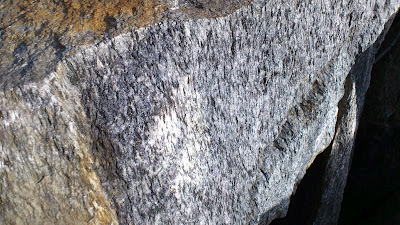
The rock here is fine grained, dark, and contains small veins, some of which cross-cut one another. The weathered surface shows a bit of foliation to the rock.


The astute observer might notice that along the fence edge there is a bunch of rubble fill which is made up of a coarser grained white rock with elongate black grains showing a foliation.


However, the wait for my flight was quite a long one, and I still wanted to stretch my legs, so I decided to continue my exploration. I continued following the path, turning left at the Statoil station and continuing along the path towards the forest in the distance.

After a short walk I came to a body of water which had an earth-bridge crossing it, leading towards a small hill with rocks exposed at its peak.


What geologist could resist? Closer investigation revealed the source of that white and black rock that is being used as fill everywhere between here and the terminal.


There are plenty of fresh surfaces to admire, sparkling in the sunlight on the side that has served as a quarry.


There are also plenty of examples of how the rock looks 'in place' on the other side of the hill.


It took me only 35 minutes to walk from my gate to the quarry outcrop, and I recommend the adventure to other travellers with time to spare who would rather enjoy fresh air and investigate the local geology than explore the over-priced airport shops.

And to show how far apart the two outcrops are: The view back to terminal from the further outcrop:

And how close the nearer outcrop is to the same control tower: